I hope you are familiar with block quotes. They are nothing but some sections of texts used for highlighting quotes from other sources. They are mostly indented from the blog post and they have different background color or text size and color.
Why Should I Use Blockquote In My Blog Articles?
If you are quoting about some matter from another blog, then it should be different. Your readers should feel the different.
- Quotations can be easily recognized from the main section of your posts.
- They can enrich and complement your theme.
- Your readers will get to know that those are special lines.
How To Design My Own Block quotes?
Most of the wordpress themes have cool block quotes, but for some it just indents the quote and changes the font size and color.
In this tutorial we are going to create blockquote using HTML code alone, without messing the stylesheet.
Actually this tutorial is quite simple and of course, the blockquotes are also simple but effective, because Simplicity is Essential.
1. Changing the Background color with some text formatting
Coding For Yellow :
<p style=”padding: 5px; background-color: #FFFF99; border: dotted 2px #FF9900;”> Text Here</p>
I love and believe in this quote ‘Impossible is Nothing’. Every new idea is a joke until one man achieves it. Concentrate and work hard for reaching your goal. Always be constant and make your mind repeat this phrase ‘Don’t give up’. Happy Blogging.
Coding For Blue :
<p style=”padding: 5px; background-color: #E1E8F2; border: dotted 2px #00518A;”>Text Here</p>
I love and believe in this quote ‘Impossible is Nothing’. Every new idea is a joke until one man achieves it. Concentrate and work hard for reaching your goal. Always be constant and make your mind repeat this phrase ‘Don’t give up’. Happy Blogging.
2. Without Changing The Background Color With Text Formatting
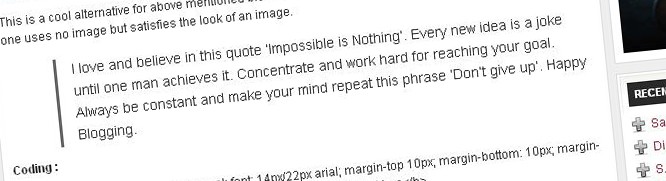
This is a cool alternative for above mentioned block quote. This creates indent from the main blog post. This one uses no image but satisfies the look of an image.
I love and believe in this quote ‘Impossible is Nothing’. Every new idea is a joke until one man achieves it. Concentrate and work hard for reaching your goal. Always be constant and make your mind repeat this phrase ‘Don’t give up’. Happy Blogging.
Coding :
<b style=”float: left; font-weight: normal; font: 14px/22px arial; margin-top 10px; margin-bottom: 10px; margin-left: 50px; padding-left: 15px; border-left: 3px solid #666666;”>Text Here</b>
Note : This Tutorial is compatible with Blogger and WordPress blogs. If you are familiar with HTML you can use your own codings to edit and customize.










You are right Pradeep – you made it very simple! This is very easy to understand for beginners… I only have question about using the colors for background : If I understand correctly, #FFFF99 is code for yellow color. Now, where can I find codes for other colors than blue and yellow?
Thanks for the effort you took to expand upon this post so thoroughly.
Why valid html code is important to your web site’s search engine optimization efforts and consequent high rankings! Such invalid html codes… A single missing bracket in your html code can be the cause your web page cannot be found in search engines… Providentially, there are free services that allow you to check and fix the validity of your html codes.
I hope this article will encourage more bloggers to turn there blog into a do follow to increase the traffic of there blogs.
Thanks for the nice tutorial, it is a nice way of using blockquote without CSS.
nice article. Do you have coding for more colors ?
.-= Money from blogging | SEO for blogger’s last blog…Ten Tips To Making Blogging = Money =-.
Now i know that block quotes is one of the blog’s beauty…You can see the example in my blog 😉
i am trying to customize blockquotes with best colors:)
I like the second point. The first point is like not-a-so-cool technique. But the second one resembles as such the Block Quote comes with many themes.
Thanks Pradeep 🙂
I had a question in the second method of creating block quote 🙂
Text Here
As the above code will generate the normal block quote with it’s default image i.e. a Straight vertical bar then the text ,What if i want some other image instead of the black vertical bar???
this is a very well writen article but i don`t understand why not use css
Great ways to do such a “required” thing.I found this really useful.Thanks indeed.Probably I needed this stuff really,thanks !
good article. so can we use this for Share this and put our soucial icons in it. within the quoates. 😆
Nice sharing dude. I use it using css, but it will come in handy
Nice info dude…I too use it..
It is really helpful. I can try different colors and styles.
Wow, that’s a great alternative. Thanks for sharing. 🙂
Thank you Pradeep.
Hey this style is pretty much similar to what a squidoo lens requires.
I had worked on a few lenses earlier this year and found them to be highly effective.
Great post.